Rotate PDF pages and save: how existing rotation affects the result
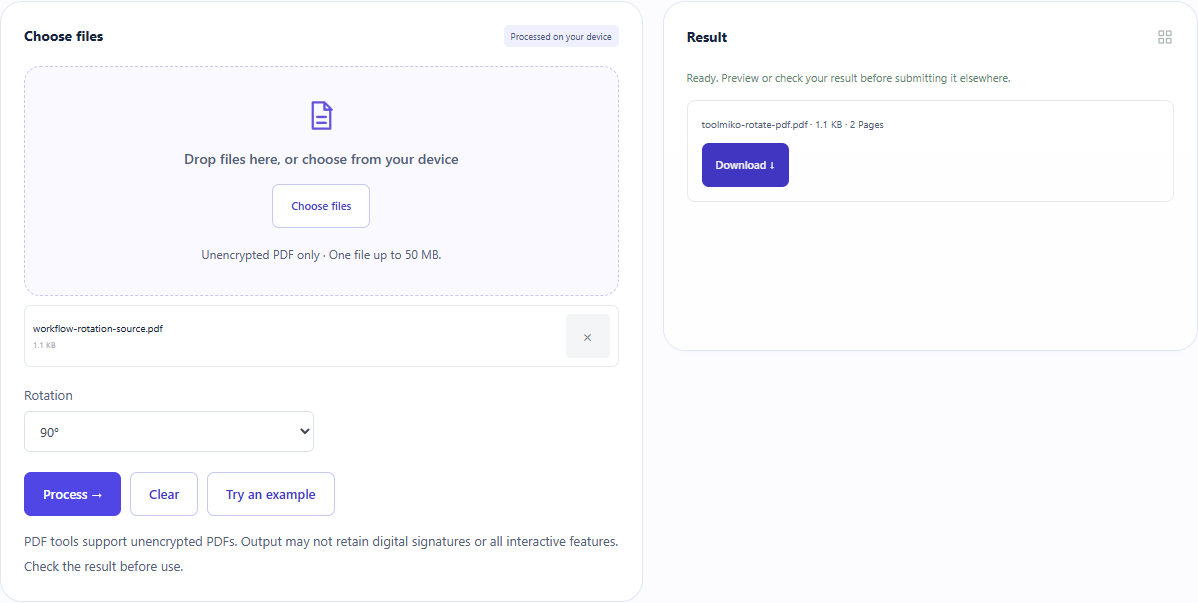
Our sample started with rotations of 0° and 90°. Adding 90° produced a downloaded PDF with rotations of 90° and 180°. The tool adds to each page’s existing rotation rather than setting every page to one absolute angle.
Open tool: Rotate PDF →What should you prepare?
- Open the original first and check whether all pages have the same orientation.
- The sample below deliberately starts with two different rotations.
- This tool rotates every page; it has no individual-page selector.
How do you use ToolMiko?
- Open Rotate PDF and upload the rotation sample.
- Choose 90°, run the tool and download the new PDF.
- Open the downloaded file and inspect every page.
- For selected pages, extract them first and carefully restore the full order when merging again.
What did the sample produce?
The saved file still has two pages with original sizes of 400×500 and 300×400 PDF points. Its page rotation values are 90° and 180°. These are saved PDF properties, not a temporary viewer setting.
| Check | Observed result |
|---|---|
| Original page rotations | 0° → 90° |
| Rotation added | +90° |
| Saved page rotations | 90° → 180° |
| PDF pages | 2 |
| File bytes | 1,130 |
These non-personal samples were generated for ToolMiko and tested in Windows Chrome on 2026-11-13. Repeat with the source files; results can differ with your files and device.
What if the result is wrong?
The pages still face different directions
They may have started with different rotations. The same increment is applied to every page; identify the pages that actually need changing before extracting and rebuilding.
A viewer rotation disappears after reopening
Some viewers only rotate the display. Download this tool’s new PDF and make sure you reopen that file rather than the original.
Limits and file handling
One PDF up to 50 MB and 5,000 pages; add 90°, 180° or 270°. There is no automatic orientation detection or correction of slight skew inside scanned images. Review encrypted, damaged or signed documents carefully.