Resize PDF pages — Steps and checked example
Checked: · ToolMiko
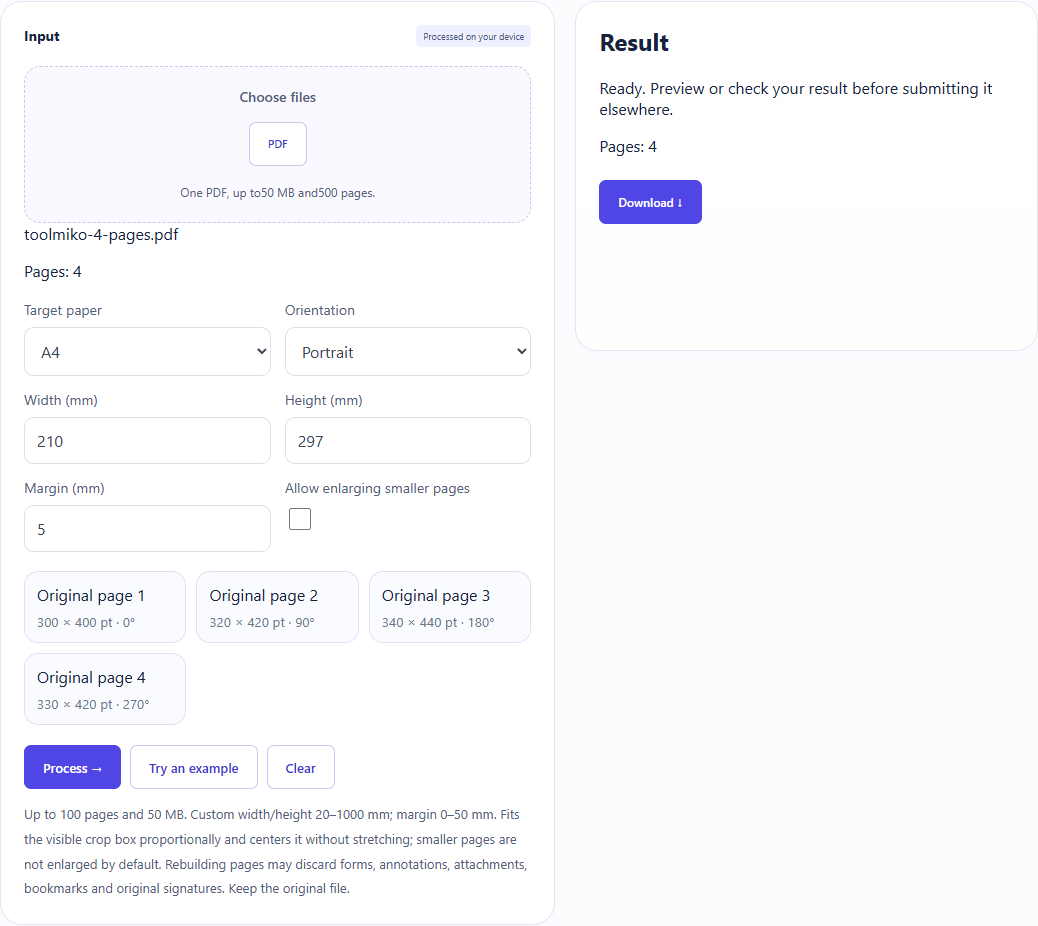
Load the four-page sample, select A4 portrait with a 5 mm margin: four 210 × 297 mm pages with centered, proportional content.
Resize PDF pages →Steps and checked example
- Choose an unencrypted PDF and wait for its page count.
- Choose A4, A3, Letter or Legal and an orientation, or enter custom width and height directly. Set margins and optionally allow small pages to enlarge.
- Run and download a new PDF. Check the target size, centered content and margins on every page; this tool resizes the whole document.
Generated fixture and downloaded result
The sample contains no user files. Screenshots and downloadable results come from actual use of this tool.
Limits and checks
Files are processed on your device without uploading; the original PDF is not changed.
Up to 100 pages and 50 MB. Custom width/height 20–1000 mm; margin 0–50 mm. Fits the visible crop box proportionally and centers it without stretching; smaller pages are not enlarged by default. Rebuilding pages may discard forms, annotations, attachments, bookmarks and original signatures. Keep the original file.