URL encoding: plus signs, spaces and Unicode in one round trip
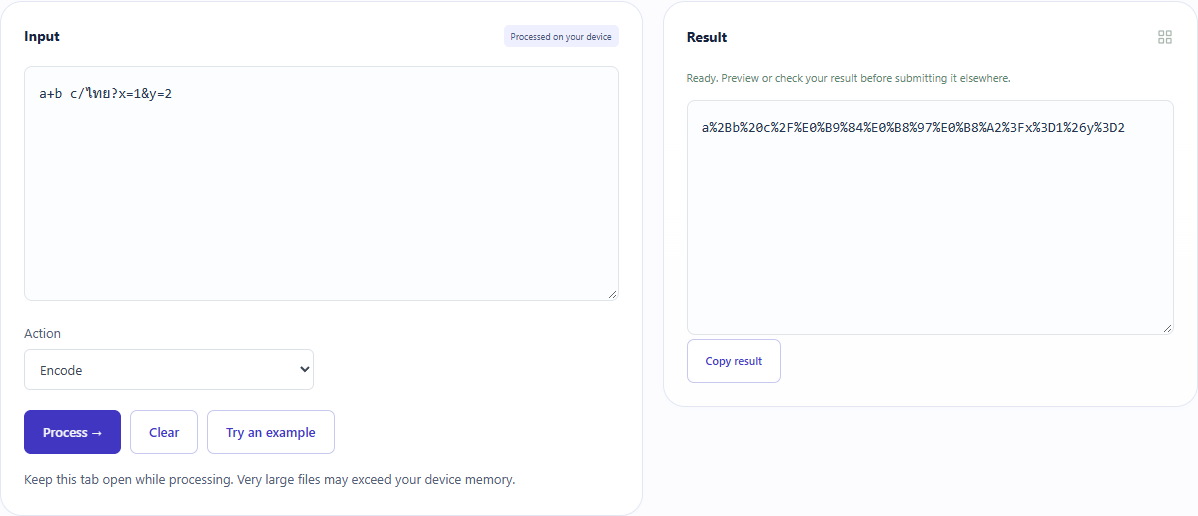
For a+b c/ไทย?x=1&y=2, the tool encodes plus as %2B and space as %20. Decoding recovers the exact original. ToolMiko encodes a URI component, not an entire URL with its separators left intact.
Open tool: URL encoder / decoder →What should you prepare?
- Identify one parameter value to encode rather than a complete working URL.
- Keep the original; a literal plus and a space are different characters.
- Paste the sample contents rather than its filename.
How do you use ToolMiko?
- Open URL codec and paste the sample.
- Choose encode and inspect %2B, %20 and the slash encoded as %2F.
- Paste the encoded result back and choose decode.
- Compare with the original, then place the encoded value into the appropriate parameter when building a link.
What did the sample produce?
The actual result matches component encoding and round-trips Thai text and delimiters. Decoding %broken fails and removes stale output. The TXT result is an editorial capture of the tool output.
| Check | Observed result |
|---|---|
| Input | a+b c/ไทย?x=1&y=2 |
| Observed result | a%2Bb%20c%2F%E0%B9%84%E0%B8%97%E0%B8%A2%3Fx%3D1%26y%3D2 |
| File bytes | 55 |
These non-personal samples were generated for ToolMiko and tested in Windows Chrome on 2026-11-13. Repeat with the source files; results can differ with your files and device.
What if the result is wrong?
A plus did not decode into a space
This decoder does not treat + as a space. Form encoding has different rules; identify the source format first.
My encoded complete URL no longer opens
Component encoding also encodes colon, slash and question mark. Encode only the required value rather than pasting the entire encoded string into the address bar.
Limits and file handling
Up to 100,000 characters, processed locally. The tool does not visit or assess a destination. Percent encoding is reversible, not encryption. Encoding again also encodes existing percent signs, so check whether your input is already encoded.