Convert a Unix timestamp by choosing seconds or milliseconds explicitly
Timestamp0 in seconds produced1970-01-01T00:00:00.000Z. Selecting the wrong unit changes the represented instant, not merely its display.
Open tool: Unix timestamp converter →What should you prepare?
- Keep the original text or file. The sample TXT describes test settings; it does not import them automatically.
- Check options before processing your content. Random outputs and browser capabilities may differ.
How do you use ToolMiko?
- Load the example and choose timestamp-to-date.
- Choose seconds and enter0, then inspect the UTC result and local-zone rows.
- For the reverse direction, use an ISO date with Z or an explicit offset.
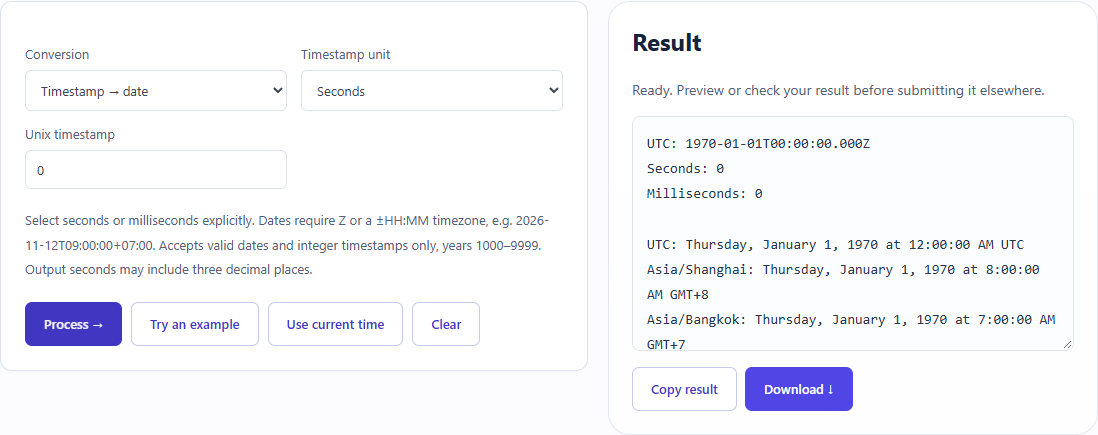
What did the sample produce?
The table and screenshot come from actual operations. TXT files are editorial check records; any additional file is a real tool export.
| Check | Observed result |
|---|---|
| Input | mode=to-date; unit=s; value=0 |
| Observed result | UTC: 1970-01-01T00:00:00.000Z Seconds: 0 Milliseconds: 0 UTC: Thursday, January 1, 1970 at 12:00:00 AM UTC Asia/Shanghai: Thursday, January 1, 1970 at 8:00:00 AM GMT+8 Asia/Bangkok: Thursday, January 1, 1970 at 7:00:00 AM GMT+7 Asia/Dhaka: Thursday, January 1, 1970 at 6:00:00 AM GMT+6 Asia/Kolkata: Thursday, January 1, 1970 at 5:30:00 AM GMT+5:30 |
| File bytes | 349 |
These non-personal samples were generated for ToolMiko and tested in Windows Chrome on 2026-11-13. Repeat with the source files; results can differ with your files and device.
What if the result is wrong?
Why is the date near1970?
A millisecond value may have been read as seconds or the reverse. Check the source system’s unit instead of relying on digit count alone.
Limits and file handling
The tool does not guess units. Date-to-timestamp input needs a timezone, and invalid calendar dates are rejected. This is an instant conversion, not a running clock or a duration calculator.