Check text contrast without treating one ratio as a full accessibility audit
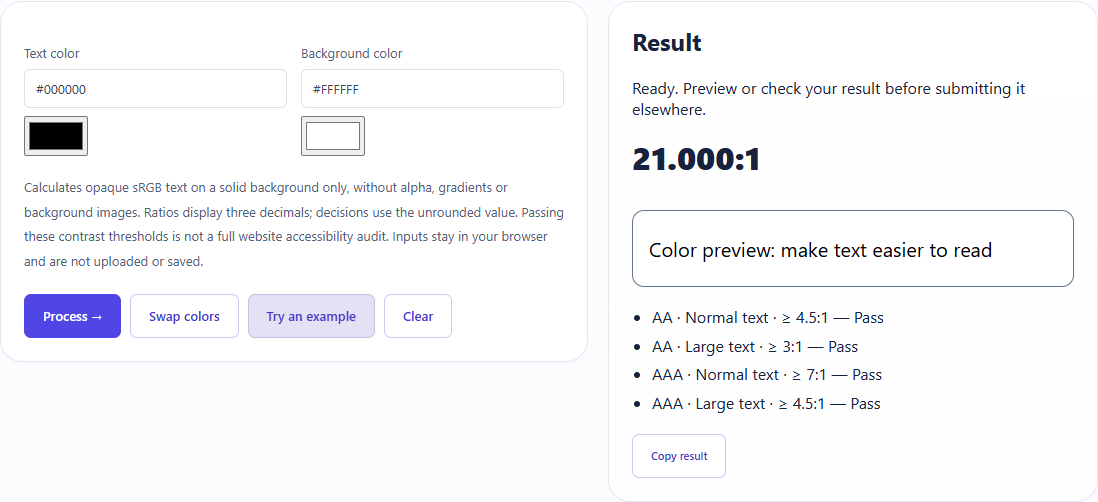
Black #000000 on white #FFFFFF produced21.000:1 and passed the four displayed text thresholds. The result covers opaque solid colors only.
Open tool: Color contrast checker →What should you prepare?
- Keep the original text or file. The sample TXT describes test settings; it does not import them automatically.
- Check options before processing your content. Random outputs and browser capabilities may differ.
How do you use ToolMiko?
- Enter the actual text and background colors, or load the black/white example.
- Calculate and read the normal-text and large-text AA/AAA rows.
- Check your actual font size, weight and background separately before applying the colors.
What did the sample produce?
The table and screenshot come from actual operations. TXT files are editorial check records; any additional file is a real tool export.
| Check | Observed result |
|---|---|
| Input | foreground=#000000; background=#FFFFFF |
| Observed result | 21.000:1 |
| File bytes | 8 |
These non-personal samples were generated for ToolMiko and tested in Windows Chrome on 2026-11-13. Repeat with the source files; results can differ with your files and device.
What if the result is wrong?
Why is a ratio near4.5 treated differently from its rounded display?
Pass/fail uses the unrounded value. The displayed three decimals should not be rounded into compliance.
Limits and file handling
Transparent colors, gradients and background images are outside this calculation. Passing text contrast does not certify an entire page or all accessibility criteria.