Remove PDF metadata — Steps and checked example
Checked: · ToolMiko
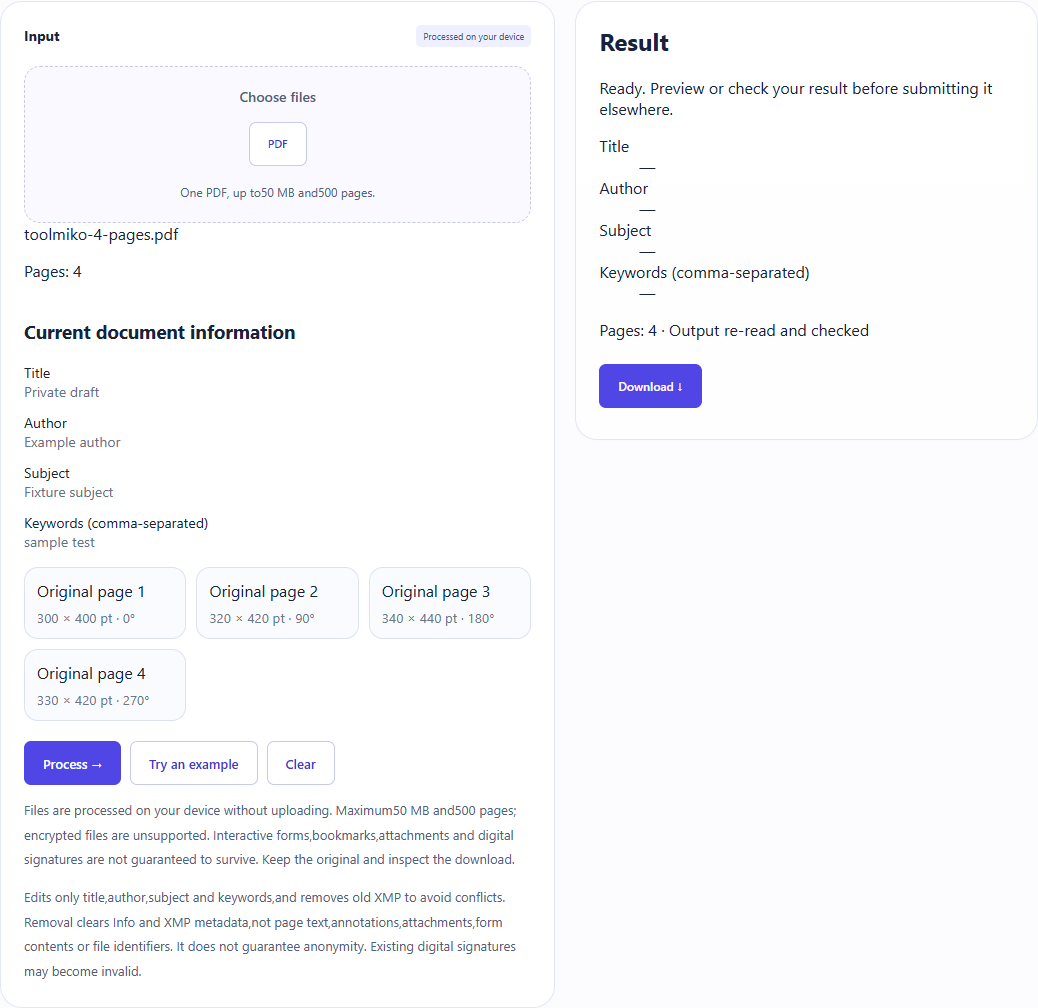
Remove the fixture title,author and XMP;retain four page sizes and rotations.
Remove PDF metadata →Steps and checked example
- Choose an unencrypted PDF and wait for its page count.
- Review current document information. No new values or page selection are needed; run the tool.
- Download a new PDF and check that the Info dictionary and XMP are removed. This does not erase information in page text, images or attachments.
Generated fixture and downloaded result
The sample contains no user files. Screenshots and downloadable results come from actual use of this tool.
Limits and checks
Files are processed on your device without uploading. Maximum50 MB and500 pages; encrypted files are unsupported. Interactive forms,bookmarks,attachments and digital signatures are not guaranteed to survive. Keep the original and inspect the download.
Edits only title,author,subject and keywords,and removes old XMP to avoid conflicts. Removal clears Info and XMP metadata,not page text,annotations,attachments,form contents or file identifiers. It does not guarantee anonymity. Existing digital signatures may become invalid.
Does removing metadata make a PDF anonymous?
No. Pages,annotations,attachments,form values and file identifiers may still identify someone. This tool removes Info and XMP;it is not content redaction. Edit document information instead →