Remove duplicate lines while keeping order: case and spaces matter
Repeated alpha lines disappeared, but Alpha and alpha with a trailing space remained. The tool compares complete lines exactly and keeps their first-occurrence order. It does not trim spaces or ignore case.
Open tool: Remove duplicate lines →What should you prepare?
- Keep an original copy before changing an important list.
- The fixture includes a trailing space, a case difference and an empty line.
- Decide whether you need exact matching or normalization before deduplication.
How do you use ToolMiko?
- Open Remove duplicate lines and paste the entire sample.
- Run it and check alpha, beta, Alpha, alpha with a trailing space, then one blank line.
- Copy the result and compare it with the original order.
- If required, normalize spaces with Text cleaner or case with Case converter before deduplicating.
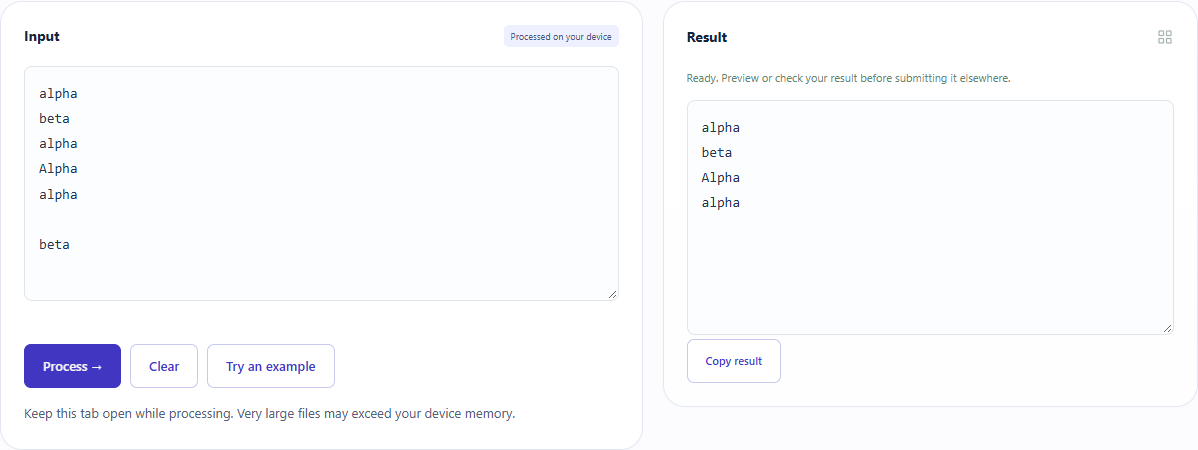
What did the sample produce?
The actual output kept the first alpha and beta, both distinct spellings and one blank line. Whitespace-only input raised an error and cleared the previous output. Downloaded fixtures make the trailing space inspectable.
| Check | Observed result |
|---|---|
| Input | alpha beta alpha Alpha alpha beta |
| Observed result | alpha beta Alpha alpha |
| File bytes | 24 |
These non-personal samples were generated for ToolMiko and tested in Windows Chrome on 2026-11-13. Repeat with the source files; results can differ with your files and device.
What if the result is wrong?
Apparently identical lines remain
Check case, leading or trailing spaces and invisible characters. Differing records are not merged automatically.
Why is one blank line left?
Repeated empty lines are also deduplicated, keeping the first one. This does not remove every empty line.
Limits and file handling
Up to 100,000 characters in the browser. This compares text lines rather than CSV records, so quoted multiline CSV needs a different workflow. There is no sorting, fuzzy matching or undo history for removed lines; keep the original.