Format JSON without changing long integers: a worked check
The sample retained 9007199254740993 and 0.123456789012345678901 exactly after formatting. ToolMiko validates syntax, then changes whitespace around original tokens instead of recalculating and serializing the numeric values.
Open tool: JSON formatter →What should you prepare?
- Keep the original JSON or download the sample text below.
- Use double quotes for keys and strings, with no comments or trailing commas.
- Plan to compare long identifiers digit by digit after formatting.
How do you use ToolMiko?
- Open JSON formatter and paste the sample file contents.
- Choose pretty formatting and run it to see line breaks and two-space indentation.
- Compare the long integer, decimal and items array with the original.
- Copy the output; choose minify and rerun when compact text is required.
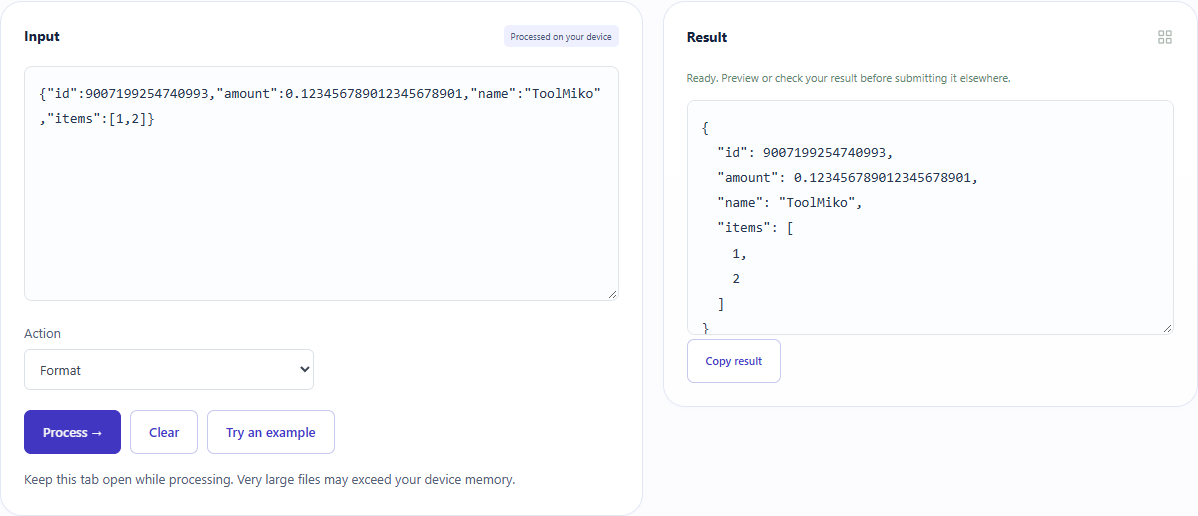
What did the sample produce?
Actual result fields were checked in all five UI languages. Both numeric tokens stayed unchanged. Invalid {"bad":} raised an error and cleared the previous result. The downloadable TXT here was saved editorially from the result field; the tool offers copying.
| Check | Observed result |
|---|---|
| Input | {"id":9007199254740993,"amount":0.123456789012345678901,"name":"ToolMiko","items":[1,2]} |
| Observed result | { "id": 9007199254740993, "amount": 0.123456789012345678901, "name": "ToolMiko", "items": [ 1, 2 ] } |
| File bytes | 118 |
These non-personal samples were generated for ToolMiko and tested in Windows Chrome on 2026-11-13. Repeat with the source files; results can differ with your files and device.
What if the result is wrong?
The input looks like JSON but fails
Check single quotes, comments, trailing commas and missing values. The tool does not guess corrections to ambiguous input.
A property name appears twice
Formatting preserves both occurrences rather than deciding which value should win. Check the structure expected by the receiving system.
Limits and file handling
Up to 100,000 input characters and 2,000,000 formatted output characters; indentation is capped at 100 levels. Processing stays in the browser and does not execute input. Preserving numeric text does not ensure another parser can read it precisely. Do not change whitespace in signed data casually.