Extract PDF pages in a chosen order: what does 2,1,2 produce?
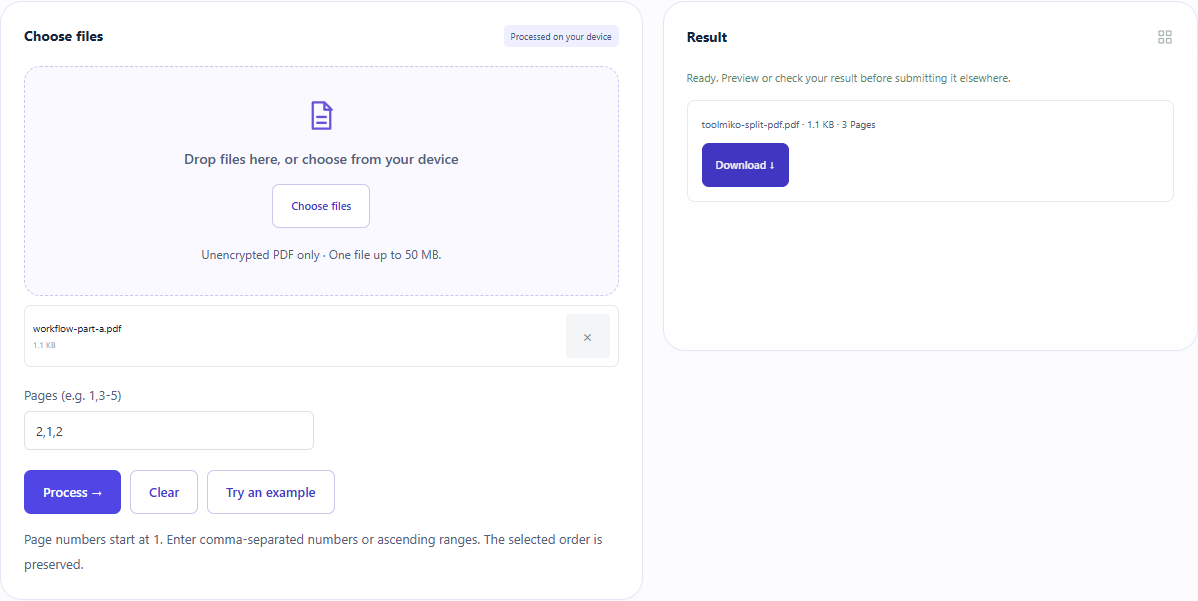
Entering 2,1,2 for our two-page PDF produced one PDF with three pages: original page 2, page 1, then page 2 again. Repeated numbers repeat pages. The tool saves the selection into one file rather than automatically exporting separate files per page.
Open tool: Extract PDF pages →What should you prepare?
- Use a PDF you can open; the downloadable input has two pages.
- Count PDF pages from 1 rather than relying on printed page labels.
- Choose an order using comma-separated page numbers or ascending ranges.
How do you use ToolMiko?
- Open Split PDF and upload the two-page fixture.
- Enter 2,1,2, run the tool and download the single PDF.
- Open it and check that the pages follow the requested 2,1,2 order.
- For a range, enter 1-2. To save individual files, process and download one page at a time.
What did the sample produce?
Parsing the downloaded PDF independently found three pages sized 300×400, 400×500 and 300×400 PDF points, matching source pages 2,1,2. Selecting nonexistent page 9 raised an error and removed the previous download.
| Check | Observed result |
|---|---|
| Input | 2,1,2 |
| PDF pages | 3 |
| Page sizes (PDF points) | 300 × 400 → 400 × 500 → 300 × 400 |
| File bytes | 1,132 |
These non-personal samples were generated for ToolMiko and tested in Windows Chrome on 2026-11-13. Repeat with the source files; results can differ with your files and device.
What if the result is wrong?
The page range is rejected
Check the source page count, start numbering at 1 and use ascending ranges. Use 1-2, not 2-1.
Why does the output contain duplicate pages?
The tool copies your list in order without deduplication. Remove the repeated page number and process the original again.
Limits and file handling
One PDF up to 50 MB and at most 5,000 output pages. Encrypted or damaged PDFs may fail; this is not a decryption tool. Processing stays in the browser. Check important forms, links and signatures afterward; processing is not signature validation.