Date difference: leap years, reversed dates and counting both endpoints
Our 2024-02-28 to 2024-03-01 example returned 2 days. Reversing the dates returned −2, and the same date returned 0. The tool subtracts start from end; it does not automatically count both endpoints or exclude weekends.
Open tool: Date difference →What should you prepare?
- Decide whether you need a date difference or an inclusive count.
- Use Gregorian dates; the sample TXT lists the two fields.
- Use another workflow for business days, holidays or times of day.
How do you use ToolMiko?
- Open Date difference and set the start to 2024-02-28.
- Set the end to 2024-03-01, run and check 2 days.
- Reverse the fields to see −2; use the same date in both for 0.
- Apply your counting rule separately. For inclusive forward ranges, add 1 to the difference.
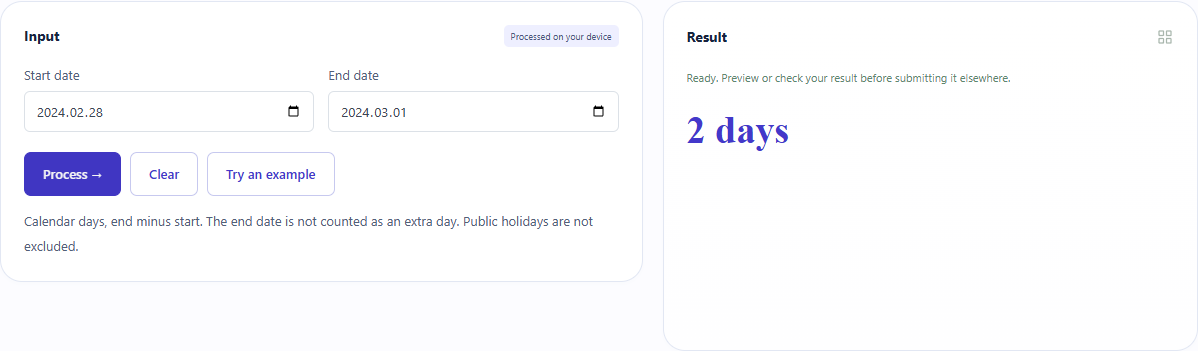
What did the sample produce?
All five UI languages showed the corresponding 2, −2 and 0. The interval includes leap day in 2024. Clearing a date removed the old result. Downloadable TXT files here are editorial records, not a tool export.
| Check | Observed result |
|---|---|
| Input | 2024-02-28 → 2024-03-01 |
| days | 2 |
These non-personal samples were generated for ToolMiko and tested in Windows Chrome on 2026-11-13. Repeat with the source files; results can differ with your files and device.
What if the result is wrong?
Why is the count one day smaller?
An elapsed difference differs from counting both endpoints. The same date has difference 0 but inclusive count 1.
Is a negative result an error?
It means the end is before the start. Reversing the fields changes the sign.
Limits and file handling
Gregorian dates are compared using UTC date boundaries so local daylight-saving hours do not change the day count. No holiday exclusions, business-day mode, time-of-day calculation or lunar-calendar conversion is provided.