Convert CSV to JSON while retaining leading zeros and quoted commas
The sample kept id 001 as a string and preserved hello, world inside one quoted field. A quoted newline stayed inside its value.
Open tool: CSV to JSON →What should you prepare?
- Keep the original text or file. The sample TXT describes test settings; it does not import them automatically.
- Check options before processing your content. Random outputs and browser capabilities may differ.
How do you use ToolMiko?
- Paste the supplied CSV including its header and quotes.
- Convert and inspect both records and the leading zeros.
- Download JSON and check that the receiving application expects string values.
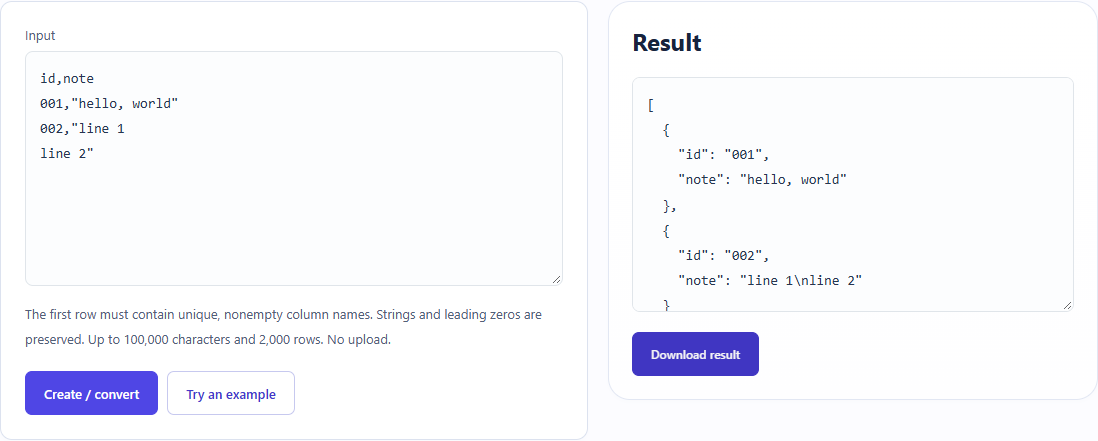
What did the sample produce?
The table and screenshot come from actual operations. TXT files are editorial check records; any additional file is a real tool export.
| Check | Observed result |
|---|---|
| Input | id,note 001,"hello, world" 002,"line 1 line 2" |
| Observed result | [ { "id": "001", "note": "hello, world" }, { "id": "002", "note": "line 1\nline 2" } ] |
| File bytes | 110 |
Download this test result: remaining-csv.json →
These non-personal samples were generated for ToolMiko and tested in Windows Chrome on 2026-11-13. Repeat with the source files; results can differ with your files and device.
What if the result is wrong?
Why are duplicate headers rejected?
A duplicate property name would make field mapping ambiguous. Use unique nonempty headers and the same field count on each record.
Limits and file handling
This tool does not infer numeric types or validate your business schema. Quoted multiline fields differ from plain text lines. Size and row limits apply; do not deduplicate CSV with a line-only tool.