Convert large integer bases without passing through a floating-point number
The decimal integer9007199254740993 converted to hexadecimal20000000000001. The tool uses integer conversion rather than a rounded ordinary number.
Open tool: Number base converter →What should you prepare?
- Keep the original text or file. The sample TXT describes test settings; it does not import them automatically.
- Check options before processing your content. Random outputs and browser capabilities may differ.
How do you use ToolMiko?
- Choose input base10 and output base16.
- Paste9007199254740993 without a prefix and run.
- To try another case, enter−FF with base16 and convert to base2.
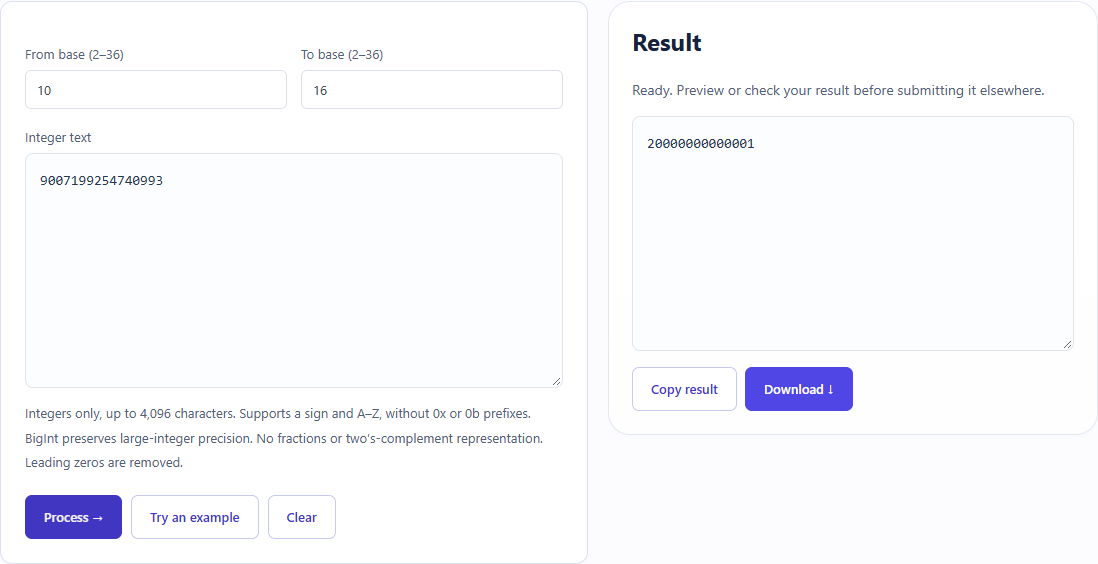
What did the sample produce?
The table and screenshot come from actual operations. TXT files are editorial check records; any additional file is a real tool export.
| Check | Observed result |
|---|---|
| Input | 9007199254740993; from=10; to=16 |
| Observed result | 20000000000001 |
| File bytes | 14 |
These non-personal samples were generated for ToolMiko and tested in Windows Chrome on 2026-11-13. Repeat with the source files; results can differ with your files and device.
What if the result is wrong?
Why does0xFF fail?
The base is selected separately; paste FF rather than the0x prefix. Every digit must be valid for the selected base.
Limits and file handling
This converts integers, not fractional numerals or two’s-complement bit patterns. Input and base limits apply. A leading minus sign represents a signed number, not a fixed-width binary encoding.