Compare world time from one UTC instant and account for daylight saving
For2026-07-01 at12:00 UTC, New York displayed08:00 and Kolkata17:30. These are the same instant in different zones, not three separate inputs.
Open tool: World time zone comparison →What should you prepare?
- Keep the original text or file. The sample TXT describes test settings; it does not import them automatically.
- Check options before processing your content. Random outputs and browser capabilities may differ.
How do you use ToolMiko?
- Enter2026-07-01T12:00 as UTC, even if your browser shows a local-style field.
- Select America/New_York as an additional zone and calculate.
- Read the full date and time for every card; compare another season when scheduling later meetings.
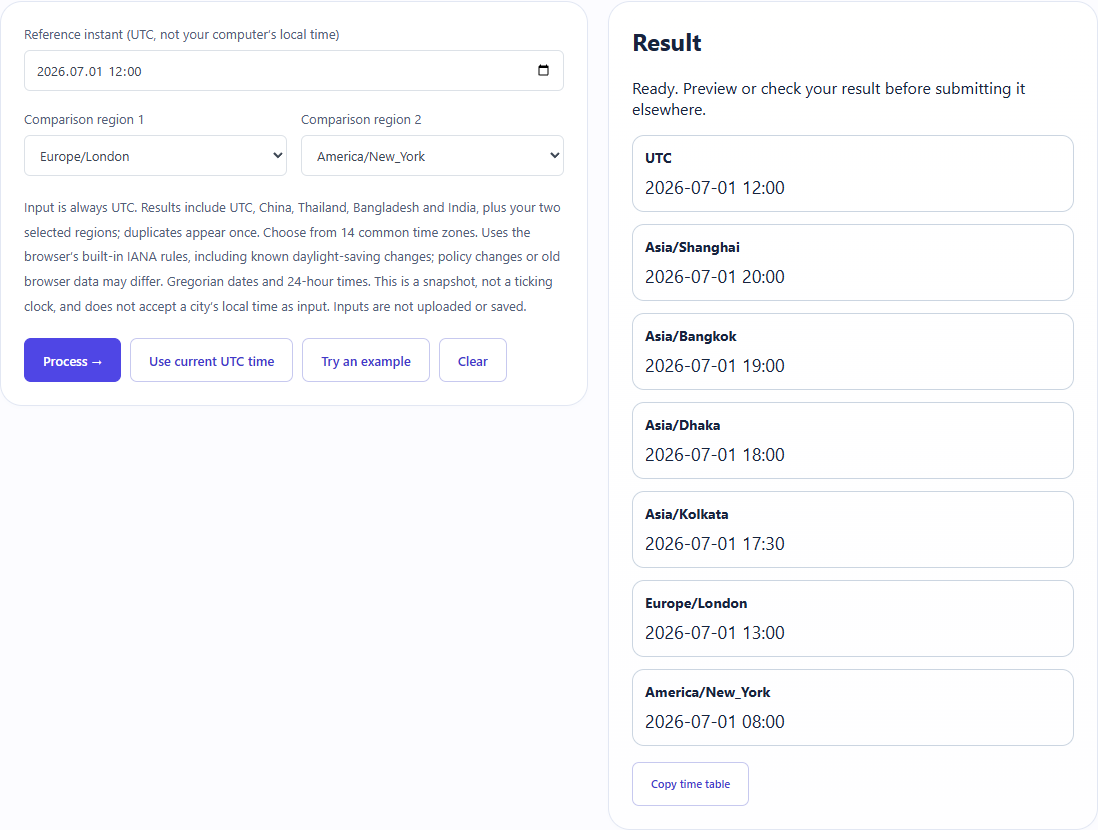
What did the sample produce?
The table and screenshot come from actual operations. TXT files are editorial check records; any additional file is a real tool export.
| Check | Observed result |
|---|---|
| Input | UTC=2026-07-01T12:00; selected=America/New_York |
| Observed result | UTC=12:00; America/New_York=08:00; Asia/Kolkata=17:30 |
| File bytes | 53 |
These non-personal samples were generated for ToolMiko and tested in Windows Chrome on 2026-11-13. Repeat with the source files; results can differ with your files and device.
What if the result is wrong?
Why does an offset change during the year?
Some IANA zones observe daylight saving. Do not substitute one fixed UTC offset for every date.
Limits and file handling
This is a single-instant comparison, not a live clock or direct local-city time parser. Available zones and date range are limited; timezone policy and browser data can change.